Wednesday, September 12, 2012

Training Magazine Network Now Bringing You eLearning Learning

I'm really excited today.  We get to finally announce that eLearning Learning has partnered with Training Magazine Network.   These two industry leaders in online learning and training bring together their extensive content and community offerings to form the largest eLearning offering on the Web.

When you visit the eLearning Learning site, you probably won't notice that much different.  You see a new logo.  But the important thing is that there's still great content on the site every day - oh hey, Karl Kapp just wrote about Gamification - hold on, let me check that out.  And if you are like me, you can't visit the site all the time, so you should sign up for a Personalized Newsletter on the right.

image

The bigger change is described by Ray Jimenez, CEO of Training Magazine Network, a fellow blogger and likely someone many of you know.  He tells us:

Online learning and training is a dynamic and growing industry. It’s not easy for our industry professionals to stay current on all of the important analysis, information and how-to pieces available. A critical element of our value is providing the kind of in-depth thinking and research that is brought together in eLearingLearning’s site and newsletter. Our members need this kind of information to stay at the top of their game, and eLearningLearning.com is the best place for them to do just that.

Ray is now putting eLearning Learning content front and center on their site and in newsletters.  You can see it in action below.  There's Karl's post.

image

Looking forward to more great things for eLearning Learning.

Tuesday, June 12, 2012

What's Wrong with Traditional Stock Photography Sources for eLearning

Back in 2007, I provided a long list of sources of stock photography for eLearning. And there are lots of other posts available on eLearning Learning Stock Photography.  But I really missed something important: traditional stock photo sources are often a pain for eLearning.

I had coffee with Bryan Jones, the founder of eLearningArt,last week in Los Angeles, and it led to a discussion about images/stock photography and eLearning.  At the start of the conversation, I wasn't quite sure why a company would focus on stock photography specifically aimed at eLearning.  But Bryan was really good at pointing out the pain that goes with getting stock photography from traditional sources and trying to use it for eLearning.

The best way to illustrate the point is with an example. Let’s say I’m creating some eLearning to teach people sales skills. I want to create scenarios where I use characters to walk through common issues that come up when a sales rep meets with customers. For that I need:

  • 1 character to represent my sales rep
  • 2 characters to represent different customers
  • Multiple poses of the sales rep and characters interacting with each other

clip_image001

If I go to a traditional stock photography site and search for business characters, I’ll find:

  • Lots of characters in a suit and tie, but not many in business casual, like my sales reps and customers wear
  • A single, finished shot, but not multiple shots of the characters together in the poses I need
  • Isolated characters only face the camera, so they’re not good to use in an interactive scene
  • People that look more like models than my customers
  • Millions of images to sort through, but very few that are relevant to me

Bryan explained that the issues above are why he created eLearningArt. He highlights that, as an eLearning developer, you would ideally have:

  • Characters shot in isolation, with the backgrounds removed, and in many poses. You can then build your own scene by inserting the character s in the poses you want onto any background.
  • “Real” looking characters of various ages and ethnicities that look like people you work with
  • Characters facing both forward for use in reaction shots, avatars, etc., as well as facing away from the camera to be used in scenarios and conversations
  • Photos organized by outfits and characters. For example, if I want an Asian male doctor, I can look under medical images, find the character I want, and know that there will be dozens of images in that pack. This greatly reduces image search time.
  • Access to other files, such as background images, other stock photos, and templates all formatted for eLearning


clip_image002

That’s not to say that traditional stock sites have no value. There are plenty of images on these sites that are useful. However, the needs of the eLearning developer are often unique, and a site that focuses on eLearning stock photography now makes a lot of sense to me.

Bryan's not the only one doing eLearning related stock photography.  Here's a bit more information on a few of these types of sites:


One Time Purchase Price (average per image)

Subscription Price (Annual per user)

Unlimited downloads

Characters by industry

Other products

eLearningArt

About $1 per

$240

Yes

Business casual, casual, suits, on the phone, medical, industrial, casual

Templates, stock photos, background images

eLearningStock

$1-$5 based on size

Not sure on this

No (credit system)

Professional, business, phone, medical

Animated characters, templates

eLearningTemplates

About $2 per

$2,500

Yes

Business, casual, industrial, medical

Games, activities, skins, templates, interactions, stock photos

Monday, January 2, 2012

eLearning Learning Adds Personalized Subscriptions

Aggregage, the platform that powers eLearning Learning has added a powerful personalization engine.  That means that eLearning Learning now allows users to sign-up and have their content personalized based on their interests.

You can sign-up via the "Personalize Your Content" button on the right side of the interface shown to the right of the red arrow below.  Or put another way, just above and right of the picture of Justin Bieber. 

eLearning-Learning-Personalization

By the way, I should point out that the four top articles on the site when I took the screen shot were all great:

It's what I love about the site.  It always has great, fresh content from a wide variety of industry professionals.  Every time I visit it, I find something that I missed that was really good content.

Now with personalization it's even better. The picture below gives a sense of what's happening:

Aggregage-Personalization

Curators handle finding the best sources of content.  The system then uses social signals such as those coming from Facebook, twitter, LinkedIn, delicious as well as clicks and views.  These are compared to averages for the source and also looks at who is providing the signal, how often they signal things, how often they signal for that particular source, etc.  Those aspects existed before and it does a good job of finding great content.  You can read a bit more about these aspects in eLearning Learning Launches New Features.

What's new now is that the site allows you to sign up and provide your Twitter and LinkedIn information.   The site will look at your activity on these sites and the content of what you share.  It will use that to find interests as well as to cluster you with other users who are like you based on interests and sharing.  You can partially control your interests via the Subscription page as shown below:

eLearning-Learning-Subscription

This will change over time based on your LinkedIn and twitter activity.  You can always visit and manually select interests as well.  You can read a bit more here: Personalization Explained.

The system then can combine three pieces of information to figure out what will be most interesting to you:

  • Social signal score – are people in the audience finding it interesting
  • Topic match – does it match up with your interests
  • Like sharing – are individuals who are like you sharing this

The system uses these to both rank things on the site and to generate Daily and Weekly newsletters.

The reason that I'm most exited about this is that I partly use eLearning Learning to make sure I don't miss things that is good content that is relevant to me.  Now with personalization, it is even less likely that something will sneak by. 

I also personally like the format of the new newsletter.

Give it a try and let me know what you think.

Monday, November 14, 2011

Flash Dead for eLearning

I've been warning about this since January 2010 in Still No Flash, and called it out further as the signs became more serious in May 2010 with Beginning of Long Slow Death of Flash.  My words then:

We are hitting a tipping point where you have to question building anything that uses Flash as the delivery mechanism. 

Screen-Shot-2011-11-09-at-12.17.08-PMIn February of 2011, Mobile Learning and the Continuing Death of Flash, I pointed to the smart moves by Rapid Intake to work around this problem.  And said,

The death of Flash is continuing.

Well, I believe we've seen continuing signs of this with Adobe moving its tools towards HTML 5.  And now, Adobe Admits: Apple Won, Flash For Mobile is Done, HTML5 is the Future.

What does all of this mean?  No More Fence Sitting!

Content Creators => you can no longer build content in Flash as a delivery vehicle.  You must adopt tools that do not rely on Flash as a delivery mechanism or at least delivery solutions to Flash and HTML 5.

Authoring Tool Companies => you must immediately talk to your product roadmap and how you will be able to deliver HTML 5 content.  You must look at how media will be handled going forward.

This may seem like a shock, but we've gone through this transition before as we move from desktop to web-based delivery.  Really Flash was part of that last wave.  It won't be part of the next wave.

Of course, that still leaves some really hard questions about how you design for all the different mobile platforms with widely different screen sizes and their non-standard inputs and widely varying connection speeds.  This is a great opportunity for mobile authoring tools to take a bite out of a much larger market much like the Director to Flash transition did back in the day.

I'll be curious to hear comments on this.

Thursday, October 13, 2011

LMS Low-Cost Webinars Hosted eCommerce Subscriptions

I was talking with a startup that has an existing audience and now want to provide a monthly subscription for access to training to this audience. They will only convert a portion of the audience to the new service. The learners will get access to webinars, recorded webinars, videos, and other online content that they will author separately.

They don't really have a tech team, so going with a hosted solution that would live at a subdomain would be best, i.e., subscribers would go to: learn.company.com in order to sign up, pay, and get access to webinars, content, etc.

They are early stage, so low-cost would be good. And it would be nice if it was a Rapid LMS.

I'm a little concerned how well LMS solutions will handle the webinar integration and the subscriptions.

What would you recommend they research as possible options?

Here are some resources that I found that may help:

And some of the resulting choices based on these resources:

More:

  • Absorb LMS (Blatant Media e-Learning)
  • Acadia HCS (Acadia HCS)
  • Allen Communication Learning Portal
  • Avilar WebMentor
  • Course-Source (Course-Source Limited)
  • CourseMill LMS (Trivantis)
  • DOTS (WebRaven)
  • ED Training Platform (Strategia)
  • Generation 21 Enterprise
  • InforSource (InfoSource)
  • Inquisiq EX (ICS Learning Group Inc.)
  • IntraLearn XE (IntraLearn Software)
  • Isoph Blue (Learn Something)
  • Kallidus LMS (e2train)
  • LearnerWeb (MaxIT)
  • LearningServer IntraLearn
  • LearnShare LMS (Learnshare)
  • LMS Live (Wizdom Systems)
  • MindFlash E-Learning System
  • NetDimensions EKP Bronze
  • OnPoint Learning & Performance Suite
  • On-Tracker LMS (Interactive Solutions)
  • OutStart Evolution LMS (OutStart)
  • SSElearn Portal (SSE)
  • Syntrio Enterprise (Syntrio)
  • TeraLearn LMS (Teralearn.com)
  • The Learning Manager (Worldwide Interactive)
  • Tracker.Net (Platte Canyon)
  • TrainingPartner (Geometrix)
  • TrainingMine (Frontline Data Solutions)
  • Upside LMS (Upside Learning Solutions)
  • Virtual Training Assistant (RISC)

And if you want a MUCH longer list, go download the 475+ LMS names from here: LMS and Learning Platforms

Monday, August 15, 2011

eLearning Learning Launches New Features

Over on eLearning Learning, we've just launched a new version with some great new features.

image

In case you don't know about eLearning Learning, it brings together content from leading experts and companies like the Adobe Captivate Blog, Clark Quinn, Clive Shepherd, Jay Cross, Karl Kapp, and really too many to list. You can find a long list of the Featured sources on the right side. There is a lot more content that comes in as well beyond the Featured sources.

The home page itself will show you the latest and best content at any time. For example as I'm writing this, I see a couple of great posts right up top:

Best is decided by the system based on social signals - that's clicks, views, twitter, delicious, and other kinds of inputs that tell us what people are doing with the content. And we try really hard to make sure that great content from lesser known sources still makes it to the top.

imageEach day, week, month and year, the site generates a "Best Of" Edition. You can change the Edition at any time. That allows you to see some really great stuff looking a little more broadly than what you typically see on the home page. For example, if I look at July's Top eLearning Posts, I find (among others):

The site is categorized in various topics such as concepts like Instructional Design, Mobile, Social Learning; tools like Twitter, LMS, Flash, PowerPoint, Captivate; Companies like Rapid Intake, Saba; types like Examples and many more. For instance you could click on Mobile Samples and find a great post Mobile Learning Samples for mLearning Developers; or via Instructional Design for Rapid eLearning you can find Instructional Designer Competencies, Top 25 Rapid eLearning Blog Posts, Over 75 Free Rapid E-Learning Resources and many other great resources.

The intent of eLearning Learning is to bring together and make it easy to find great content. You will only see a snippet of each piece. When you click the link, you will be directed back to the source. In other words, we bring the content together, but we don't own the content. We want you still to comment and interact with the content back on the original site.

Visiting the site is probably one of the better ways to get to the content, but you can also subscribe to it by entering your email address and then choosing whether you want a Daily Edition or Weekly/Monthly/Annual Edition to be sent to you. If you've not already subscribed, then go over and do it now. It's worth the 30 seconds it takes.

There are some pretty interesting new features coming soon for eLearning Learning. We look forward to continuing to improve the site. If you have thoughts, or comments, please feel free to contact me: Tony Karrer via email at: akarrer@techempower.com.

Last, but certainly not least, this site is generously sponsored and made possible by Rapid Intake. Without them, we could not afford to keep the lights on. Please support them so we can continue to make this site better and better.

Wednesday, June 22, 2011

Emerging Asynchronous Conversation Models

I had an interesting conversation with Patrick Randolph from TalkWheel about different kinds of asynchronous conversation models that are emerging and how they might fit into broader eLearning Initiatives.  Particularly we focused on the implications of TalkWheel, Quora and Namesake.  Below I've captured aspects of our conversation (interestingly enough done via email - how old school).  This post represents thinking from both of us that I've edited heavily to make it more easily consumed here in the blog. 

There's obvious value in bringing the classroom collaboration dynamic to online learning.  We see some of this dynamic when we run webinars and have chat.  We also see it in twitter (see  Twitter for Learning).  The main issue with these is that the primary value is in the real-time nature.  While Twitter is asynchronous, it's not easily used as other kinds of tools for discussion.

The standard model for asynchronous conversations is discussion forum software like vBulletin.  I've talked before about the significant value that can be obtained as part of Discussion Forums for Knowledge Sharing at Capital City Bank and how that translates in a Success Formula for Discussion Forums in Financial Services.  I also looked at Making Intranet Discussion Groups Effective.

However, I've struggled with the problem of destinations vs. social networks and the spread of conversation (see Forums vs. Social Networks).  Because of that I've been watching closely what's happening with various tools that have different ways of supporting asynchronous conversation models.  There are some new tools emerging that have a different take.

Talkwheel  is made to handle real-time group conversations and asynchronous ones.  It can act as an instant messaging service a bit like Yammer, HipChat for companies and other groups, but the layout is designed to make these discussions easier to see, archive, and work asynchronously.  Because of the ability to attach documents, it can act like a collaboration platform.  Each comment made within a thread appears as a tiny circle next to the name of the person who made the comment, and is linked by arrow to the person to whom the comment was made. The comments are also stacked and color-coded on the right side of the screen for reference.  This organization makes the conversation seem more like a roundtable discussion. 
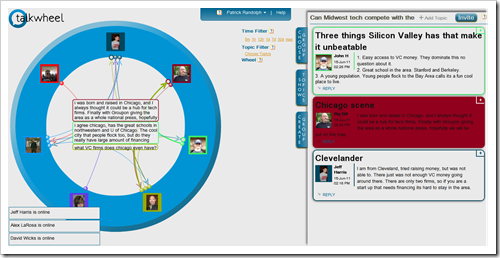
TW Screenshot_full

Patrick tells us:

Talkwheel’s design makes class conversations easier to follow, more interactive, and more effectively organized. It eliminates the problem of navigating multithreaded conversations, enables real-time group conversation, and makes referencing asynchronous conversations much easier. Talkwheel’s dashboard organization allows teachers to organize all their classes and projects in one centralized location, while Talkwheel's analytics helps teachers and administrators quantitatively monitor their students’ progress throughout the year. Talkwheel’s collaboration platform is a new way of bringing students together in a way that is conducive to the group needs of online learning. In addition to e-learning, Talkwheel helps enterprises improve productivity and communication both internally and externally and allows users to organize their social and professional networks in an effective manner. It can be tried for free at Talkwheel.com.

Quora is a Q&A site nicely integrated with Facebook that has done a good job providing a means to ask questions and get answers.   Each Quora answer is rated by users until the most popular answer is found.  You can see a question below that had 16 answers provided by some pretty good folks and the top answer had 586 votes.

image

The answers are then used to provide valuable information to Quora users and the rest of the web. Quora has been able to form quite an elite network of VCs, entrepreneurs, and other experts to answer questions.  They've also created topic pages such as: Learning Management System.  It collects questions answer answers on that particular topic - you'll notice that there's not much expertise flowing around eLearning topics.

image

Finally, Namesake, is a tool for real-time and asynchronous conversations.  It's a bit like Quora but more focused on conversation as compared to Q&A and it allows real-time conversation a bit like twitter.  You can see an example of a conversation around phones below.

image

Like Quora, the goal is to build a network of user selected experts to provide valuable information to users. Within Namesake, any user can create topics of conversation for real-time chat and can follow conversations. Unlike Quora, Namesake is designed for real-time chats very similarly to the AIM Chat Rooms of old. New comments are stacked on top of the most recent one, updates are done in real-time, and chats are organized by high-level subject.

TalkWheel has taken a very different approach to its conversation model and is definitely aimed at smaller groups.  I think that each conversation model has it's place and TalkWheel is more competitive with forum software but a much different visual model.  Quora and Namesake are more trying to address the conversation from social networks issue.

All of these point to new types of conversation models that are emerging in tools.